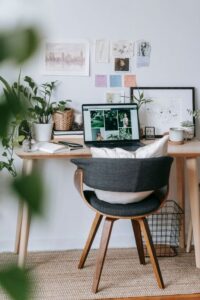
Tips for Creating a Cozy and Functional Home Workspace


Creating a cozy and functional home workspace is essential for anyone working from home or pursuing personal projects. A well-designed workspace boosts productivity, reduces stress, and makes work more enjoyable. Whether you have a dedicated room or a small corner, these tips will help you set up a space that balances comfort and efficiency.
Choose the Right Location
Consider Natural Light
Natural light is one of the best elements to include in your workspace. It helps reduce eye strain and improves mood. Position your desk near a window if possible, but avoid glare on your computer screen by arranging your setup carefully. If natural light is limited, use soft, adjustable artificial lighting to create a warm atmosphere.
Minimize Distractions
Select a quiet spot away from busy household areas. If noise is unavoidable, consider noise-canceling headphones or soft background music to maintain focus. The right location sets the foundation for a productive day.
Invest in Comfortable and Practical Furniture
Ergonomic Chair and Desk
Comfort is key when selecting your desk and chair. Choose an ergonomic chair that supports your back and encourages good posture. Adjustable desks or standing desks allow you to change positions, which helps prevent fatigue.
Adequate Desk Space
Make sure your desk has enough surface area for your computer, documents, and any tools you use regularly. A clutter-free desk helps keep your mind clear and focused.
Organize Efficiently
Use Storage Solutions
Clutter can distract and stress you. Use shelves, drawers, and organizers to keep supplies and documents neatly stored. Label containers to easily find what you need.
Cable Management
Prevent tangled cords by using cable clips, sleeves, or under-desk trays. A tidy workspace is both visually appealing and safer.
Personalize Your Space
Add Decorative Touches
Items like plants, artwork, or a favorite mug can make your workspace more inviting. Plants not only add color but also improve air quality and increase feelings of calm.
Use Color Wisely
Colors impact mood and productivity. Soft, neutral shades encourage relaxation, while brighter accents like blue or green can stimulate creativity and focus.
Optimize Technology Setup
Reliable Equipment
Ensure your computer, internet connection, and other equipment are reliable to avoid frustration. Back up your work regularly to prevent data loss.
Monitor Placement
Set your monitor at eye level to reduce neck strain. Using a separate keyboard and mouse can also improve comfort.
Maintain a Healthy Work Routine
Take Breaks
Incorporate short breaks every hour to stretch and rest your eyes. This helps maintain energy and prevents burnout.
Keep Hydrated and Nourished
Keep water and healthy snacks nearby to stay hydrated and energized throughout your work session.
Lighting Tips for a Cozy Workspace
Layer Your Lighting
Combine ambient, task, and accent lighting. Ambient lighting provides overall illumination, task lighting focuses on work areas, and accent lighting adds warmth.
Use Warm Light Bulbs
Warm light bulbs (2700K–3000K) create a cozy atmosphere, while cooler lights are better for detailed tasks.
Tips for Small Spaces
Multi-Functional Furniture
Use desks with built-in storage or fold-away options to save space. Consider wall-mounted shelves to keep the floor clear.
Vertical Space
Make use of vertical space for storage and decor to maximize a small area efficiently.
Keep It Clean Regularly
A tidy workspace reflects a tidy mind. Schedule time at the end of each day to organize your desk and prepare for the next day. This simple habit keeps your space functional and welcoming.
—
By combining comfort, organization, and personal touches, you can create a home workspace that feels inviting and supports productivity. Start with small changes and adjust your setup as needed to find what works best for you. Your perfect workspace is just a few thoughtful steps away!